8.15.2024

Lua超新手無窮迴圈的陷阱

 以下Lua Code:

math.log2 = function (x)
    return math.log(x) / math.log(2)
end
...
 for i = math.floor(math.log2(n)) - 1, math.floor(math.log2(n)) do
 ...

n是 >= 0的整數,要注意for有可能造成無窮迴圈,
因為math.log(0)是-inf,不會彈出錯誤,
所以造成for變成無窮迴圈,而不只是做兩次…
另外注意,-inf跟同樣是-inf比對是true, 例如:
ath.log(0) == -3/0
==> true
若是nan比對,一定是false, 例如:
math.log(-1) == math.log(-1)
==> false

5.01.2023

如何在Windows 11 or 10遊玩SafeDisc保護的遊戲(純轉載沒試過)

 Ref:Microsoft Safedisc - Microsoft Community

Microsoft didn't make SafeDisc, it was created by the Rovi Corporation. You can learn more at: How to Play Games with SafeDisc or SecureRom DRM on Windows 10

is to use the one stop option - Driver Signature Enforcement Overrider 1.3b

I've never used this, but it does apparently work. However, I've been using noCD fix\hacks since I started using PC for games in 2004.


The easiest way to do this is to employ the Driver Signature Enforcement Overrider tool, which, when run as administrator, enables you to sign a previously untrusted file.

muo-gaming-w10-retro-drm-admin

Once you've acquired a copy of the SECDRV.SYS file (either by downloading it or copying it from the c:\windows\system32\drivers directory on Windows Vista, 7 or 8, and saving it to the same location in Windows 10), run the DSEO tool by right-clicking dseo13b.exe and selecting Run as administrator.

muo-gaming-w10-retro-drm-sign

Work through the subsequent dialogue boxes until you see the main menu and select Enable Test Mode then click Next.

This time, select Sign a System File, and browse to the SECDRV.SYS file in c:\windows\system32\drivers. Click OK, and wait while the driver is signed. You'll see the following message:

muo-gaming-w10-retro-drm-complete

Once you have followed the instructions to restart and then run DSEO again with Test Mode enabled, the driver should now be loaded by the game you've had trouble with, restoring your ability to play it.

(Should you be using Windows 10 Technical Preview, enabling Test Mode will result in a watermark appearing on your display. This can be removed using the Remove Watermark option in DSEO.)

Ref:NGOHQ.com

How to Play Games with SafeDisc or SecureRom DRM on Windows 10 (makeuseof.com)

4.06.2023

父母照


12.14.2022

Miller–Rabin primality test (implement in Swift)

 func power(_ xx: Int, _ yy: Int, _ p: Int) -> Int

{
	var res = 1	 // Initialize result
	var x = xx % p // Update x if it is more than or
				// equal to p
	var y = yy
        while (y > 0)
	{
		// If y is odd, multiply x with result
		if 1 == y % 2{
			res = (res*x) % p
                }

		// y must be even now
		y = y>>1 // y = y/2
		x = (x*x) % p
	}
	return res
}

// false if n is composite and returns true if n is
// probably prime.
// d is an odd number such that d*2<sup>r</sup> = n-1
// for some r >= 1
func miillerTest(_ dd: Int, _ n: Int) -> Bool
{
	// Pick a random number in [2..n-2]
	// Corner cases make sure that n > 4
	let a = 2 + Int.random(in: 0...n-4)
        var d = dd
	// Compute a^d % n
	var x = power(a, d, n);

	if (x == 1 || x == n-1){
            return true
        }
	// Keep squaring x while one of the following doesn't
	// happen
	// (i) d does not reach n-1
	// (ii) (x^2) % n is not 1
	// (iii) (x^2) % n is not n-1
	while (d != n-1)
	{
		x = (x * x) % n;
		d *= 2;

		if (x == 1) {return false}
		if (x == n-1) {return true}
	}

	// Return composite
	return false
}

// It returns false if n is composite and returns true if n
// is probably prime. k is an input parameter that determines
// accuracy level. Higher value of k indicates more accuracy.
func isPrime(_ n: Int, _ k: Int) -> Bool
{
	// Corner cases
	if (n <= 1 || n == 4) {return false}
	if (n <= 3) {return true}

	// Find r such that n = 2^d * r + 1 for some r >= 1
	var d = n - 1
	while (d % 2 == 0){
		d /= 2
        }

	// Iterate given number of 'k' times
	//for (int i = 0; i < k; i++)
        for i in 0..<k{
		if (!miillerTest(d, n)){
			return false
                }
        }

	return true
}

6.12.2022

document.getElementById("demo").innerHTML在jquery中即$('#demo')[0].innerHTML

 1. 首先在HTML head加上:

 <script src="//ajax.googleapis.com/ajax/libs/jquery/2.1.1/jquery.min.js"></script>

2. document.getElementById("demo")可用$('#demo')[0]取代,例如:

document.getElementById("demo").innerHTML = "Hello JavaScript!";

可寫成:

$("#demo")[0].innerHTML = "Hello JavaScript!";

12.29.2021

Macos Safari search 被redirect到Yahoo 解法

    經實際測試,Malwarebytes有効。 


  1. Download Malwarebytes Free.

    You can download Malwarebytes for Mac by clicking the link below.

    MALWAREBYTES FOR MAC DOWNLOAD LINK
    (The above link will open a new page from where you can download Malwarebytes for Mac)
  2. Double-click on the Malwarebytes setup file.

    When Malwarebytes has finished downloading, double-click on the setup file to install Malwarebytes on your computer. In most cases, downloaded files are saved to the Downloads folder.

    Double-click on setup file to install Malwarebytes

  3. Follow the on-screen prompts to install Malwarebytes.

    When the Malwarebytes installation begins, you will see the Malwarebytes for Mac Installer which will guide you through the installation process. Click “Continue“, then keep following the prompts in order to continue with the installation process.

    Click Continue to install Malwarebytes for Mac

    Click again on Continue to install Malwarebytes for Mac for Mac

    Click Install to install Malwarebytes on Mac

    When your Malwarebytes installation completes, the program opens to the Welcome to Malwarebytes screen. Click the “Get started” button.

  4. Select “Personal Computer” or “Work Computer”.

    The Malwarebytes Welcome screen will first ask you on what type of computer are you installing this program, click either Personal Computer or Work Computer.
    Select Personal Computer or Work Computer mac

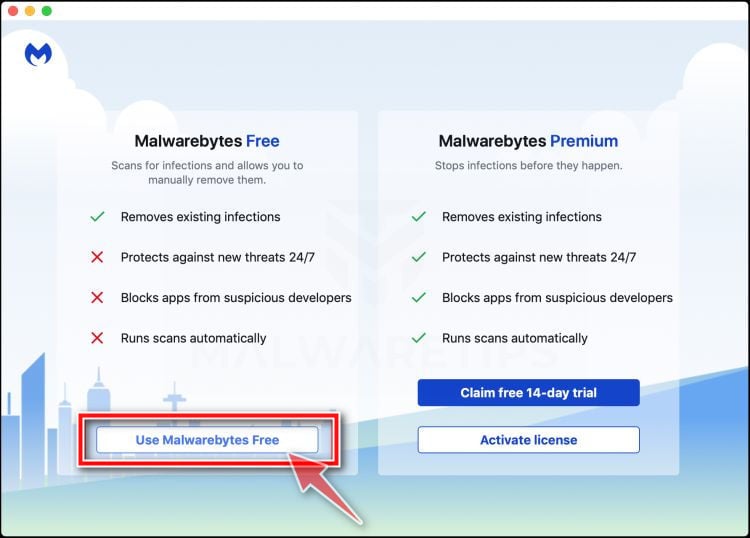
  5. Select “Use Malwarebytes Free”.

    You’ll be then prompted to select between the Malwarebytes Free and the Premium version. The Malwarebytes Premium edition includes preventative tools like real-time scanning and ransomware protection, however, we will use the Free version to clean up the computer.
    Click on “Use Malwarebytes Free“.
    Click on Use Malwarebytes Free Mac

  6. Click on “Scan”.

    To scan your computer with Malwarebytes, click on the “Scan” button. Malwarebytes will automatically update the antivirus database and start scanning your computer for Search.surfharvest.xyz malware.
    Click on Scan button to start a system scan Mac

  7. Wait for the Malwarebytes scan to complete.

    Malwarebytes will scan your computer for the Search.surfharvest.xyz browser hijacker and other malicious programs. This process can take a few minutes, so we suggest you do something else and periodically check on the status of the scan to see when it is finished.
    Wait for Malwarebytes for Mac to scan for Search.surfharvest.xyz browser hijacker

  8. Click on “Quarantine”.

    When the scan has completed, you will be presented with a screen showing the malware infections that Malwarebytes has detected. To remove the Search.surfharvest.xyz malware that Malwarebytes has found, click on the “Quarantine” button.
    Review the malicious programs and click on Quarantine Search.surfharvest.xyz browser hijacker

  9. Restart computer.

    Malwarebytes will now remove all the malicious files that it has found. To complete the malware removal process, Malwarebytes may ask you to restart your computer.
    Malwarebytes For Mac requesting to restart computer
    When the malware removal process is complete, you can close Malwarebytes and continue with the rest of the instructions.

11.30.2021

First Trade 配息解讀

Order Status -> All

Dividend KO -> i

COCA COLA COMPANY
(THE)
CASH DIV ON 8 SHS
REC 09/15/21 PAY 10/01/21
NON-RES TAX WITHHELD
$1.01000
$3.36

個人解讀:
2021年 8張KO股票,共配發3.36元
扣掉1.01000元稅金…(實領2.35元)