9.08.2014

(轉貼)Android 反編譯與防止被反編譯

Android 反編譯與防止被反編譯

Android App使用Java語言進行開發,因此十分容易就可以被反編譯出近乎原始的程式碼。也因為這個特性,許多人在寫Android App的時候會喜歡去反編譯別人寫好的程式,再挪為己用,雖然很不道德,但這也是一種有效提升軟體開發速度的方法。但換個角度想,如果是自己寫的程式碼被盜走的話,這就對自己不太有利了,所以學習如何防止自己程式碼被偷也是一個很重要的課題。
Android App的安裝檔案是副檔名為.apk的檔案,可以直接在Android環境下執行,將App安裝好。若要將App上架Google Play上,必須要先將Android專案輸出成簽署(Signed)過的apk檔。再將這個apk檔案上傳到Google Play上發佈出去。將App上架後,其他使用者就可以透過Google Play直接安裝該App
很明顯地,提供apk檔案給別人安裝App,是十分危險的事情,因為apk檔案只要經過簡單的步驟(之後會提到)就可以反編譯出原始的程式碼。但如果覺得將App上架Google Play上就一定安全的話,那就大錯特錯了,因為從Google Play上安裝的App,也是有辦法拿到它的apk檔。

反編譯Android程式

首先要取得Android Appapk檔案,接著使用「dex2jar」來將它轉為jar檔。
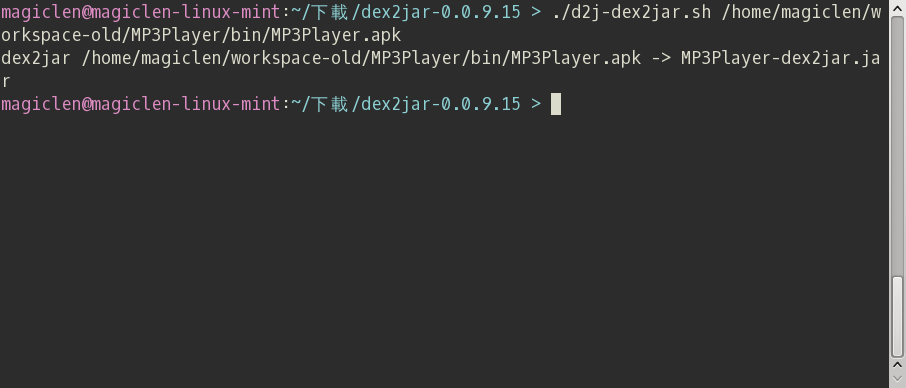
dex2jar在命令列下使用,命令格式如下:
d2j-dex2jar.sh apk路徑
Android 反編譯與防止被反編譯
執行命令後,稍等一下子,jar檔案就產生出來了。
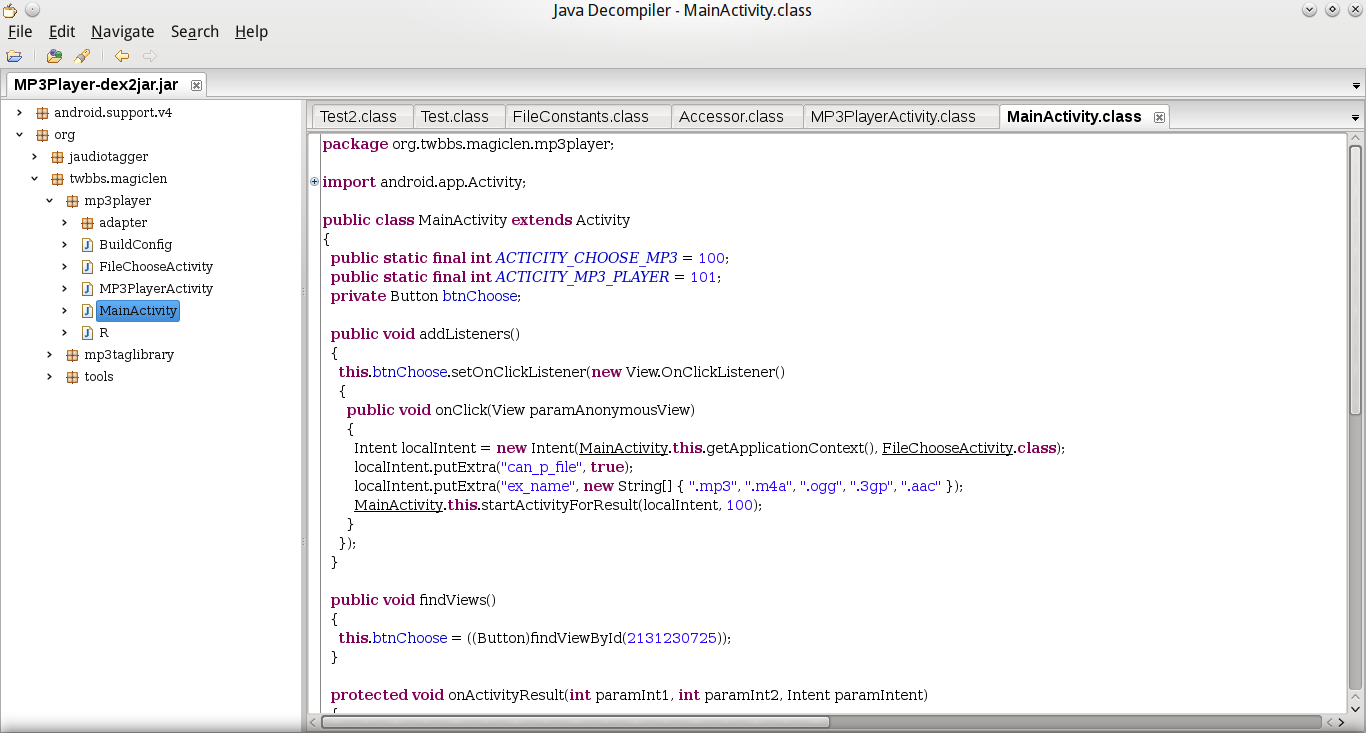
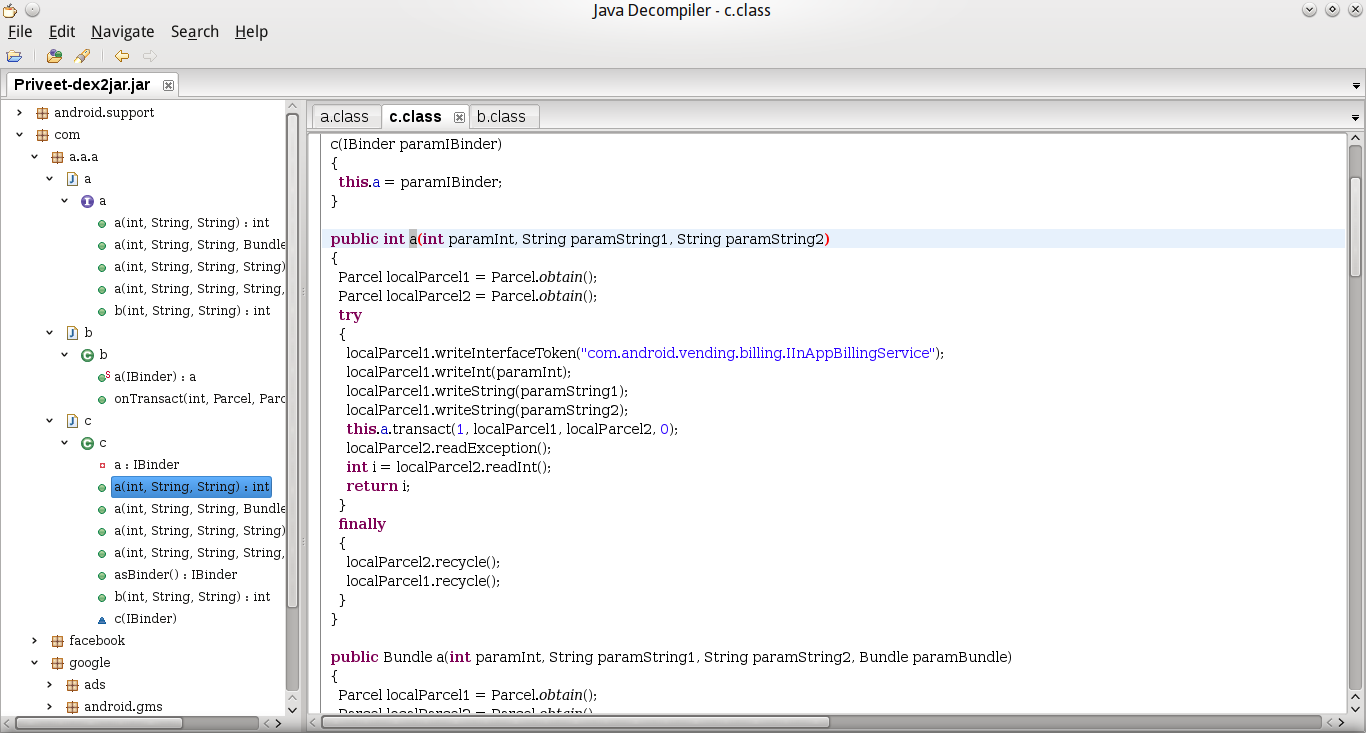
接著再依照這篇文章反編譯jar檔案。
Android 反編譯與防止被反編譯

防止Android程式被反編譯

反編譯Android程式的方式可以不必學,但防止反編譯的方式一定要會!

Android ProGuard

Android SDK中提供了ProGuard來保護與最佳化Android App的安裝檔。身為一位稱職的Android程式設計師,在Android App發佈或是上架之前一定要使用ProGuard來保護程式碼,避免程式遭有心人士偷走。

啟用ProGuard

Android專案根目錄下,有個「project.properties」檔案,找到以下字串,並移除掉前面的「#」,即可啟用ProGuard。
#proguard.config=${sdk.dir}/tools/proguard/proguard-android.txt:proguard-project.txt
這行文字的意思是告訴Eclipse在編譯Android的時候使用proguard對程式碼進行混淆,並指定混淆的參數設定檔。預設的Android專案會在開頭加上「#」,表示此行文字為註解,也就是沒有開啟ProGuard。

使用ProGuard

啟用ProGuard之後,往後使用Android的Export工具來輸出專案,都會自動把程式碼給混淆。無須再進行而外的動作。

啟用ProGuard可能會遭遇的問題

由於有些程式是不可以被混淆的,例如有使用到「Class.forName」這類方法來呼叫的套件。可以藉由修改Android專案目錄下的ProGuard設定檔「proguard-project.txt」,加入-keep參數來保留指定的程式碼不被混淆。通常-dontwarn參數也會跟-keep合用,目的是要讓ProGuard不要去檢查指定Class下程式碼的錯誤(當然若有出現錯誤再加也不遲)。
有許多程式用了ProGuard之後會出現型別轉換錯誤,可以加上「-keepattributes Signature」參數,保留程式的簽名。
以下是proguard-project.txt的設定參考:
1
2
3
4
5
6
7
8
9
-keep class com.google.** { *; }
-dontwarn com.google.**
 
-keep class com.facebook.** { *; }
-dontwarn com.facebook.**
 
-keep class org.apache.** { *; }
-dontwarn org.apache.**
-keepattributes Signature
混淆後的程式碼,如果被反編譯,就沒什麼人看得懂啦!
Android 反編譯與防止被反編譯

關於作者


Magic Len


各位好,我是Magic Len,是這網站的管理員。我是台灣台中大肚山上人,畢業於台中高工資訊科,目前就讀台灣科技大學資訊工程系。我熱愛自然也熱愛科學,喜歡和別人分享自己的知識與經驗。如果你有興趣認識我,可以加我的Facebook,並且請註明是從MagicLen來的。

7.31.2014

How can I get the Google cache age of any URL or web page?

http://stackoverflow.com/questions/4560400/how-can-i-get-the-google-cache-age-of-any-url-or-web-page

 How can I get the Google cache age of any URL or web page?

Use the URL
http://webcache.googleusercontent.com/search?q=cache:
Example:
http://webcache.googleusercontent.com/search?q=cache:stackoverflow.com
It contains a header like this:
This is Google's cache of http://stackoverflow.com/. It is a snapshot of the page as it appeared on 21 Aug 2012 11:33:38 GMT. The current page could have changed in the meantime. Learn more
Tip: To quickly find your search term on this page, press Ctrl+F or +F (Mac) and use the find bar.

6.01.2014

How to Add "Open with Notepad" to Right-Click (轉貼)

同理可應用到Notepad++,
參:http://www.instructables.com/id/How-to-Add-Open-with-Notepad-to-Right-Click/

How to Add "Open with Notepad" to Right-Click

I personally hate to use "open with" due to the time, even if its only a few seconds, and having to then remember where exactly a certain program is located in my directory.

This will show you how to add ANY program to the Right-Click (Context Menu for all of your Files).

It's Easy, you cant screw it up, and it saves a bunch of time and hassle.

Since we will be dealing with regedit, and not everyone is familiar with it, i will be breaking down the steps to very simple, easy, and concise steps that anyone can follow.

 
Remove these adsRemove these ads by Signing Up

Step 1: First

Go to Start and open Run

Step 2: Second

Type in regedit.exe and click OK.

Step 3: Third

Find and expand (click on the + to the left) HKEY_CLASSES_ROOT

Step 4: Fourth

Browse down to the * key and expand it (click on the + to the left of the folder)

Step 5: Fifth

Find the key shell

Step 6: Sixth

Right Click on the key shell, go to New and create a new Key

Step 7: Seventh

Name that Key "Open with Notepad"

Right click on the Open with Notepad key and make another Key

Step 8: Eighth

Name the new Key "command"

Step 9: Ninth

Click on the command key and double click on 'the (Default) value

Step 10: Tenth

Type in "notepad.exe %1" There is a space between "notepad.exe" and "%1"

Click on OK

Step 11: Finished

Close regedit and marvel at the ease of opening text documents!

Effects should occur immediately.

Remember:

This can be used for any and all programs.

In case you are just completely confused, use the following zip file (which also comes with a handy uninstall) that will change your regedit key accordingly)

Download OpenWithNotepad registry hack

2.02.2013

tortoisegit: git did not exit cleanly (exit code 128 or code 1)解法

用tortoise git,出現git did not exit cleanly (exit code 128),

但是用git卻成功。我發現移除後,再重灌無效。

但是 

1. 移除tortoise git後,

2. Open 'regedit', 再手動search 'tortoisegit'機碼,

全部刪除後。

3. 再重灌,重灌選git default的ssh,

就不會有錯了。enjoy~

 Note: 有試過這樣也無效,後來就放棄tortoise git,直接改用Git了。 

 也有可能是Git的路徑多了空白的問題:

B

Hmmm....

I unzipped the portable version into the typical install dir: "C:\Program Files (x86)\Git", and got the same errors.
Unzipped into "C:\git2", and it worked as expected.
Perhaps the problem is with the spaces in the path?

(But why does it work on the other computer....?!)


9.26.2012

Don't always declare global variable in C/C++

If you always declare global variable instead of local,
Once you using recursive call, you may get run time error.
See

SPOJ Problem 1436: Is it a tree – PT07Y

if you move

list<int>::iterator it;
 
 from local variable to global variable, you will get run time error 
by input following:
3 2
1 3
3 2 


4.09.2012

Random Go program ~ Brown

幾天前想寫一個GTP(Go Text Protocol) base的隨機下棋程式,
不過看了一下GTP Spec. 雖然不是很複雜,但真正要寫,
也需要一些時間,所以一直沒有實際下去寫。
今天重看GTP spec. 的網站,突然發現一個叫Brown的程式,
正好符合我的需求,很快地就下載source回來看看能否Build win版…
首先用wxDevC++,開啟一個C++的console專案,
將main.cpp的內容換成brown.c的內容,並且加入剩下的檔案到專案中,
結果在Build時,有一些錯誤,
在interface.c加上#include "string.h"就OK了。
Build成exe後,發現用Panda-glGo還是不能玩,
就去下載Drago, 稍微設定一下,
It's work!

後記:
我改了一下,使Brown go可以在Panda-glGo上玩,
下載檔案及source code