7.05.2019

0/0未定義的原因 (小學數學)

0/0是未定義,那為何0/0不是1呢?是否有反例?
我想到的反例如下:(這是我自己想的,如有錯誤,還請指正)
Assume 0/0 = 1,
if 2x = 3x
=> x = 1.5x, so x = 0
=> 0 = 1.5 * 0
兩邊同除0
=> 0/0 =1.5 * 0/0
=> (0/0) = 1.5 * (0/0)
We assume 0/0 = 1
=> 1 = 1.5 * 1
=> 1 = 1.5, 所以這是0/0 = 1的反例

那麼0/0是否等於0呢?
這個我不知道真正的反例,
但是這樣0/0就不能上下消去得到1了。
至於0/0等於其它數值,可以簡單得到反例,
這就不提了。


6.13.2019

Differential and Partial differential


Differential of a function

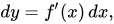
dy=f'(x)\,dx,
where  is the derivative of f with respect to x, and dx is an additional real variable (so that dy is a function of x and dx). The notation is such that the equation
holds, where the derivative is represented in the Leibniz notation dy/dx, and this is consistent with regarding the derivative as the quotient of the differentials. One also writes


satisfies
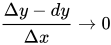
where the error ε in the approximation satisfies ε/Δx → 0 as Δx → 0. In other words, one has the approximate identity
in which the error can be made as small as desired relative to Δx by constraining Δx to be sufficiently small; that is to say,
as Δx → 0. For this reason, the differential of a function is known as the principal (linear) part in the increment of a function: the differential is a linear function of the increment Δx, and although the error ε may be nonlinear, it tends to zero rapidly as Δx tends to zero.

the partial differential of y with respect to any one of the variables x1 is the principal part of the change in y resulting from a change dx1 in that one variable. The partial differential is therefore

參:
https://en.wikipedia.org/wiki/Differential_of_a_function


全微分和偏微分有什麼不同
假設 z = x^7 + y^3 + 3(x^2)*(y^4) + 4xy + 98 
z為應變數 , x y為自變數 

全微分 : 
就是所有變數通通都要微分 
dz = 7x^6dx + 3y^2dy + 6x(y^4)dx + 12(x^2)*(y^3)dy + 4ydx + 4xdy + 0 
ps. 兩變數相乘的 , 如同一般乘法的微分 , 前微後不微+前不微後微 

偏微分 : 
只對要微的自變數微分 , 其他的都當作常數 
1.對 x 偏微 
∂z/∂x = 7x^6 + 0 + 6x(y^4) + 4y + 0 

2. 對 y 偏微 
∂z/∂y = 0 + 3y^2 + 12(x^2)*(y^3) + 4x + 0

參:
https://tw.answers.yahoo.com/question/index?qid=20050930000013KK04937


5.22.2019

pdf2txt

pdf2txt.py

pdf2txt.py从PDF文件中提取文本内容。它提取所有要以编程方式呈现的文本,即以ASCII或Unicode字符串表示的文本。它无法识别绘制为需要光学字符识别的图像的文本。它还为每个文本部分提取相应的位置,字体名称,字体大小,书写方向(水平或垂直)。访问受到限制时,您需要为受保护的PDF文档提供密码。您无法从没有提取权限的PD文档中提取任何文本。
$ pdf2txt.py -o output.html samples/naacl06-shinyama.pdf
(extract text as an HTML file whose filename is output.html)

$ pdf2txt.py -V -c euc-jp -o output.html samples/jo.pdf
(extract a Japanese HTML file in vertical writing, CMap is required)

$ pdf2txt.py -P mypassword -o output.txt secret.pdf
(extract a text from an encrypted PDF file)
有关详细信息,请参阅/docs/index.html。

PDFMiner.six

PDFMiner.six is a fork of PDFMiner using six for Python 2+3 compatibility
Build Status PyPI version
PDFMiner is a tool for extracting information from PDF documents. Unlike other PDF-related tools, it focuses entirely on getting and analyzing text data. PDFMiner allows one to obtain the exact location of text in a page, as well as other information such as fonts or lines. It includes a PDF converter that can transform PDF files into other text formats (such as HTML). It has an extensible PDF parser that can be used for other purposes than text analysis.


from pdfminer.layout import LAParams
from pdfminer.converter import PDFPageAggregator
from pdfminer.pdfinterp import PDFResourceManager, PDFPageInterpreter
from pdfminer.pdfpage import PDFPage
from pdfminer.layout import LTTextBoxHorizontal
import sys, os

os.environ["PYTHONIOENCODING"] = 'utf-8'
sys.stdout.reconfigure(encoding='utf-8')
#print(sys.stdout.encoding)
#print(os.environ["PYTHONIOENCODING"])
            
document = open('Pfizer1.pdf', 'rb')
rsrcmgr = PDFResourceManager()
laparams = LAParams()
device = PDFPageAggregator(rsrcmgr, laparams=laparams)
interpreter = PDFPageInterpreter(rsrcmgr, device)
for page in PDFPage.get_pages(document):
    interpreter.process_page(page)
    layout = device.get_result()
    for element in layout:
        if isinstance(element, LTTextBoxHorizontal):
            obj = element._objs[0]
            print("x_cor: %.2f " % obj.bbox[0])
            print("y_cor: %.2f" % obj.bbox[1])
            print("length: %.2f" % obj.bbox[2])
            print("height: %.2f" % obj.bbox[3])
            text = obj.get_text().replace('\n','')
            #btext = text.encode(encoding='utf-8')
            print("text: ", text)
            print("--------------------")

8.27.2018

Python 3 call C by ctypes

point.h
/* Point.h */
/* Simple structure for ctypes example */
typedef struct {
    int x;
    int y;
} Point;

point.c
/* Point.c */
#include "stdio.h"
#include "point.h"

/* Display a Point value */
void show_point(Point point) {
    printf("Point in C      is (%d, %d)\n", point.x, point.y);
}

/* Increment a Point which was passed by value */
void move_point(Point point) {
    show_point(point);
    point.x++;
    point.y++;
    show_point(point);
}

/* Increment a Point which was passed by reference */
void move_point_by_ref(Point *point) {
    show_point(*point);
    point->x++;
    point->y++;
    show_point(*point);
}

/* Return by value */
Point get_point(void) {
    static int counter = 0;
    Point point = { counter++, counter++ };
    printf("Returning Point    (%d, %d)\n", point.x, point.y);
    return point;
}


For mingw32:
gcc -fPIC -shared -msse4.2 point.c -o point.dll

使用point.py連point.dll:
import ctypes
def wrap_function(lib, funcname, restype, argtypes):
    """Simplify wrapping ctypes functions"""
    func = lib.__getattr__(funcname)
    func.restype = restype
    func.argtypes = argtypes
    return func
   
class Point(ctypes.Structure):
    _fields_ = [('x', ctypes.c_int), ('y', ctypes.c_int)]
    def __repr__(self):
        return '({0}, {1})'.format(self.x, self.y)
       
libc = ctypes.CDLL('point.dll')
show_point = wrap_function(libc, 'show_point', None, [Point])
p = Point(1, 2)
show_point(p)

正常的話,會出現:
Point in C      is (1, 2)

如果出現以下錯誤訊息:
OSError: [WinError 193] %1 is not a valid Win32 application

可能是因為Python是x64版的,但是dll是32 bits
詳參:

Error loading DLL in python, not a valid win32 application


ctypes更複雜的例子,可參考:

8.25.2018

"undefined reference to" 問題解決方法

在此,只舉個靜態庫的例子,假設源碼如下。
先把test.c編譯成靜態庫(.a)文件
  1. gcc -c test.c
  2. ar -rc test.a test.o
至此,我們得到了test.a文件。我們開始編譯main.c
  1. gcc -c main.c
這時,則生成了main.o文件,然後我們再通過如下命令進行連結希望得到可執行程序。
你會發現,編譯器報錯了:
  1. /tmp/ccCPA13l.o: In function `main':
  2. main.c:(.text+0x7): undefined reference to `test'
  3. collect2: ld returned 1 exit status
其根本原因也是找不到test函數的實現文件,由於該test函數的實現在test.a這個靜態庫中的,故在連結的時候需要在其後加入test.a這個庫,連結命令修改為如下形式即可。
  1. gcc -o main main.o ./test.a //註:./ 是給出了test.a的路徑
【擴展】:同樣,為了把問題說清楚,上面我們把代碼的編譯連結分開了,如果希望一次性生成可執行程序,則可以對main.c和test.a執行如下命令。
  1. gcc -o main main.c ./test.a //同樣,如果不加test.a也會報錯


原文網址:https://read01.com/GAQBKx.html

.o, .a, .so, .la 如何產生

o, .a, .so, .la 如何產生

  • 建立 .o
    $ gcc -c test.c
  • 建立 .a
    $ ar -r libtest.a test1.o test2.o
  • 建立動態函式庫 .so
    $ gcc -Wall -fpic -shared test1.c test2.c -o libtest.so
  • 鍊結函式庫
    $ gcc -Wall -fpic -shared -Ltest test3.c -o libtest.so
  • 建立 .la, .la 一般會使用 Makefile 產生, 可以透過下述命令產生:
    $ libtool --mode=link gcc -o libmylib.la -rpath /usr/lib –L/usr/lib –la

Linux 的 .a / .so / .la 函式庫的差異

  • .o (obj file) 是目標物件函式庫, 等同於 Windows 的 .obj
  • .a 為靜態函式庫, 可以是 一個 或 多個 .o 合在一起, 用於靜態連結
  • .la 為 libtool 生成的共享函式庫, 其實是個設定的檔案. 可以用 file 代替
  • .la 可用 vi 來查看
  • .so 為動態函式庫, 類似 Windows 的 DLL(Dynamic-link library)檔.
  • 補充: 還有一種附檔名為 .ko 的檔案, 不過它是 Linux 核心使用的動態連結文件, 屬於模組程式, 用來在 Linux 系統啟動時, 加掛核心模組用.

gcc -fPIC -shared -msse4.2 great_module.c -o great_module.dll


聊聊Python ctypes 模块


摘要:模块ctypes是Python内建的用于调用动态链接库函数的功能模块,一定程度上可以用于Python与其他语言的混合编程。由于编写动态链接库,使用C/C++是最常见的方式,故ctypes最常用于Python与C/C++混合编程之中。
=================================================================
1. ctypes 的原理以及优缺点
从ctypes的文档中可以推断,在各个平台上均使用了对应平台动态加载动态链接库的方法,并通过一套类型映射的方式将Python与二进制动态链接库相连接。通过阅读ctypes本身的代码也可以印证这个推断(/Modules/_ctypes/_ctypes.c和/Modules/_ctypes/callproc.c)。在Windows平台下,最终调用的是Windows API中LoadLibrary函数和GetProcAddress函数,在Linux和Mac OS X平台下,最终调用的是Posix标准中的dlopen和dlsym函数。ctypes 实现了一系列的类型转换方法,Python的数据类型会包装或直接推算为C类型,作为函数的调用参数;函数的返回值也经过一系列的包装成为Python类型。也就是说,PyObject* <-> C types的转换是由ctypes内部完成的,这和SWIG是同一个原理。
从ctypes的实现原理不难看出:
ctypes 有以下优点:
  • Python内建,不需要单独安装
  • 可以直接调用二进制的动态链接库
  • 在Python一侧,不需要了解Python内部的工作方式
  • 在C/C++一侧,也不需要了解Python内部的工作方式
  • 对基本类型的相互映射有良好的支持
ctypes 有以下缺点:
  • 平台兼容性差
  • 不能够直接调用动态链接库中未经导出的函数或变量
  • 对C++的支持差
就个人的经验来看,ctypes 适合于“中轻量级”的Python C/C++混合编程。特别是遇到第三方库提供动态链接库和调用文档,且没有编译器或编译器并不互相兼容的场合下,使用ctypes特别方便。值得注意的是,对于某种需求,在Python本身就可以实现的情况下(例如获取系统时间、读写文件等),应该优先使用Python自身的功能而不要使用操作系统提供的API接口,否则你的程序会丧失跨平台的特性。
2. 一个简单的例子
作为Python文档的一部分,ctypes 提供了完善的文档。但没有Windows API编程经验的初学者读ctypes文档仍然会晕头转向。这里举一个小例子,尽力避开Windows API以及POSIX本身的复杂性,读者只需要了解C语言即可。
在尝试本节例子之前,依然要搭建Python扩展编程环境。见 搭建Python扩展开发环境 - 蛇之魅惑 - 知乎专栏
首先我们写一个C语言的小程序,然后把它编译成动态链接库。
//great_module.c
#include 

#ifdef _MSC_VER
    #define DLL_EXPORT __declspec( dllexport ) 
#else
    #define DLL_EXPORT
#endif

DLL_EXPORT int great_function(unsigned int n) {
    return _mm_popcnt_u32(n);
}
这个源文件中只有一个函数 great_function,它会调用Intel SSE4.2指令集的POPCNT指令(封装在_mm_popcnt_u32中),即计算一个无符号整数的二进制表示中“1”的个数。如果你的电脑是2010年前购买的,那么很可能不支持SSE4.2指令集,你只需要把return这一行改为 return n+1;即可,同样能够说明问题。
调用_mm_popcnt_u32需要包含Intel 指令集头文件nmmintrin.h,它虽然不是标准库的一部分,但是所有主流编译器都支持。
中间还有一坨#ifdef...#else...#endif,这个是给MSVC准备的。因为在MSVC下,动态链接库导出的函数必须加 __declspec( dllexport ) 进行修饰。而gcc(Linux和Mac OS X的默认编译器)下,所有函数默认均导出。
接下来把它编译为动态链接库。Windows下动态链接库的扩展名是dll,Linux下是so,Mac OS X下是dylib。这里为了方便起见,一律将扩展名设定为dll。
Windows MSVC 下编译命令:(启动Visual Studio命令提示)
cl /LD great_module.c /o great_module.dll 
Windows GCC、Linux、Mac OS X下编译命令相同:
gcc -fPIC -shared -msse4.2 great_module.c -o great_module.dll
写一个Python程序测试它,这个Python程序是跨平台的:
from ctypes import *
great_module = cdll.LoadLibrary('./great_module.dll')
print great_module.great_function(13)
整数13是二进制的1101,所以应该输出3