| |
equal sign (=)
decimal points (.) semicolon (;) increment (++) operators decrement (--) operators ( ) Parenthesis { } Braces [ ] Brackets , Comma ; Semicolon ' Quote @ At + plus 加號;正號 - minus 減號;負號 ± plus or minus 正負號 × is multiplied by 乘號 ÷ is divided by 除號 = is equal to 等號 ≠ is not equal to 不等號 ≡ is equivalent to 全等於號 ≌ is equal to or approximately equal to 等於或約等於號 ≈ is approximately equal to 約等於號 < is less than 小於號 > is more than 大於號 ≮ is not less than 不小於號 ≯ is not more than 不大於號 ≤ is less than or equal to 小於或等於號 ≥ is more than or equal to 大於或等於號 % per cent 百分之… ‰ per mill 千分之… ∞ infinity 無限大號 ∝ varies as 與…成比例 √ (square) root 平方根 ∵ since; because 因爲 ∴ hence 所以 ∷ equals, as (proportion) 等於,成比例 ∠ angle 角 ⌒ semicircle 半圓 ⊙ circle 圓 ○ circumference 圓周 π pi 圓周率 △ triangle 三角形 ⊥ perpendicular to 垂直於 ∪ union of 聯集 ∩ intersection of 交集 ∫ the integral of …的積分 ∑ (sigma) summation of 總和 ° degree 度 ′ minute 分 〃 second 秒 ℃ Celsius system 攝氏度 { open brace, open curly 左大括弧 } close brace, close curly 右大括弧 ( open parenthesis, open paren 左小括號 ) close parenthesis, close paren 右小括號 () brakets/ parentheses 括弧 [ open bracket 左中括號 ] close bracket 右中括號 [] square brackets 中括號 . period, dot 句號,點 vertical bar, vertical virgule 豎線 & ampersand, and, reference, ref 和,引用 * asterisk, multiply, star, pointer 星號,乘號,星,指標 / slash, divide, oblique 斜線,斜杠,除號 // slash-slash, comment 雙斜線,注釋符 # pound 井號 \ backslash, sometimes escape 反斜線轉義符,有時表示轉義符或續行符 ~ tilde 波浪符 . full stop 句號 , comma 逗號 : colon 冒號 ; semicolon 分號 ? question mark 問號 ! exclamation mark (英式英語) exclamation point (美式英語) ' apostrophe 撇號 - hyphen 連字號 -- dash 破折號 ... dots/ ellipsis 省略號 " single quotation marks 單引號 "" double quotation marks 雙引號 ‖ parallel 雙線號 & ampersand = and ~ swung dash 相似 § section; division 分節號 → arrow 箭號; |
11.19.2014
特殊符號的英文讀法(轉貼)
標籤:
Key
9.25.2014
(轉貼)How do I tell what type my shell is
How can I tell what type my shell is? ie, whether it's traditional sh, bash, ksh, csh, zsh etc.
Note that checking
$SHELL or $0 won't work because $SHELL isn't set by all shells, so if you start in one shell and then start a different one you may still have the old $SHELL.$0 only tells you where the shell binary is, but doesn't tell you whether /bin/sh is a real Bourne shell or bash.
I presume that the answer will be "try some features and see what breaks", so if anyone can point me at a script that does that, that'd be great.
|
標籤:
Linux
9.08.2014
(轉貼)Android 反編譯與防止被反編譯
Android 反編譯與防止被反編譯
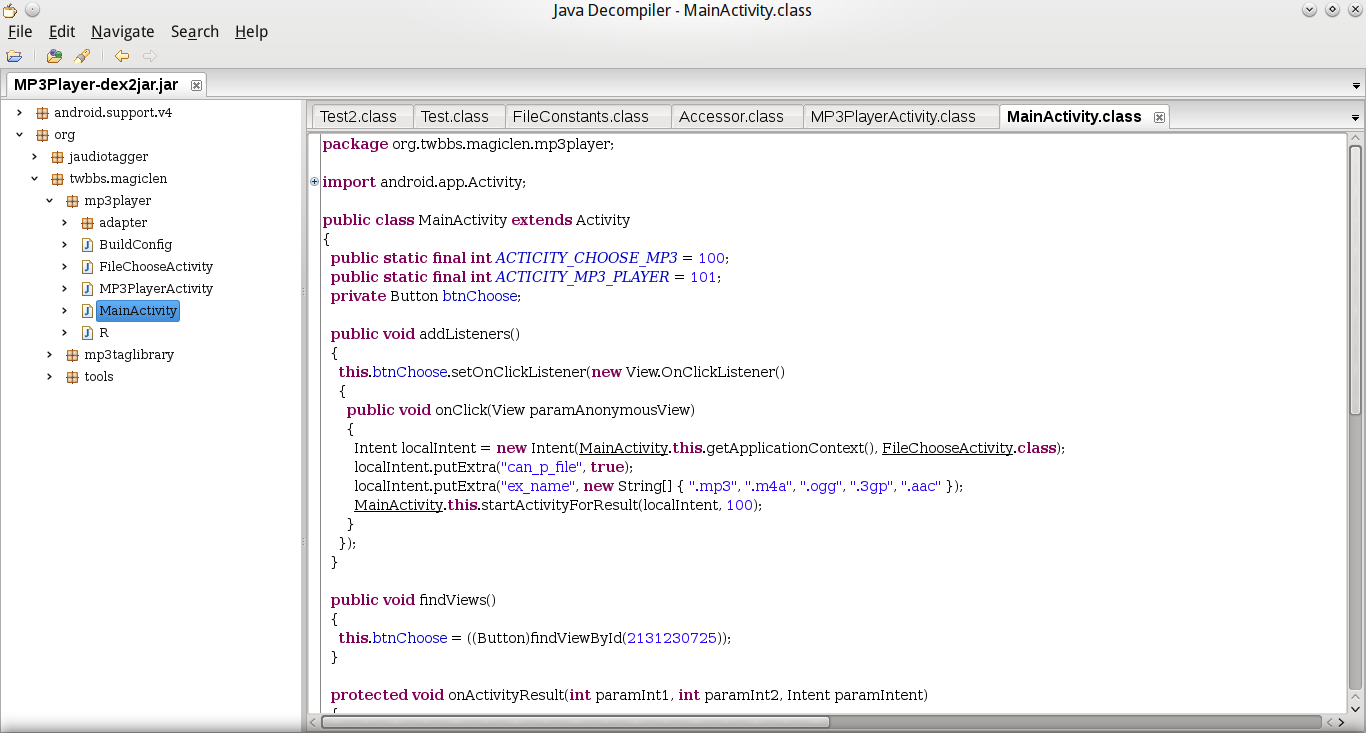
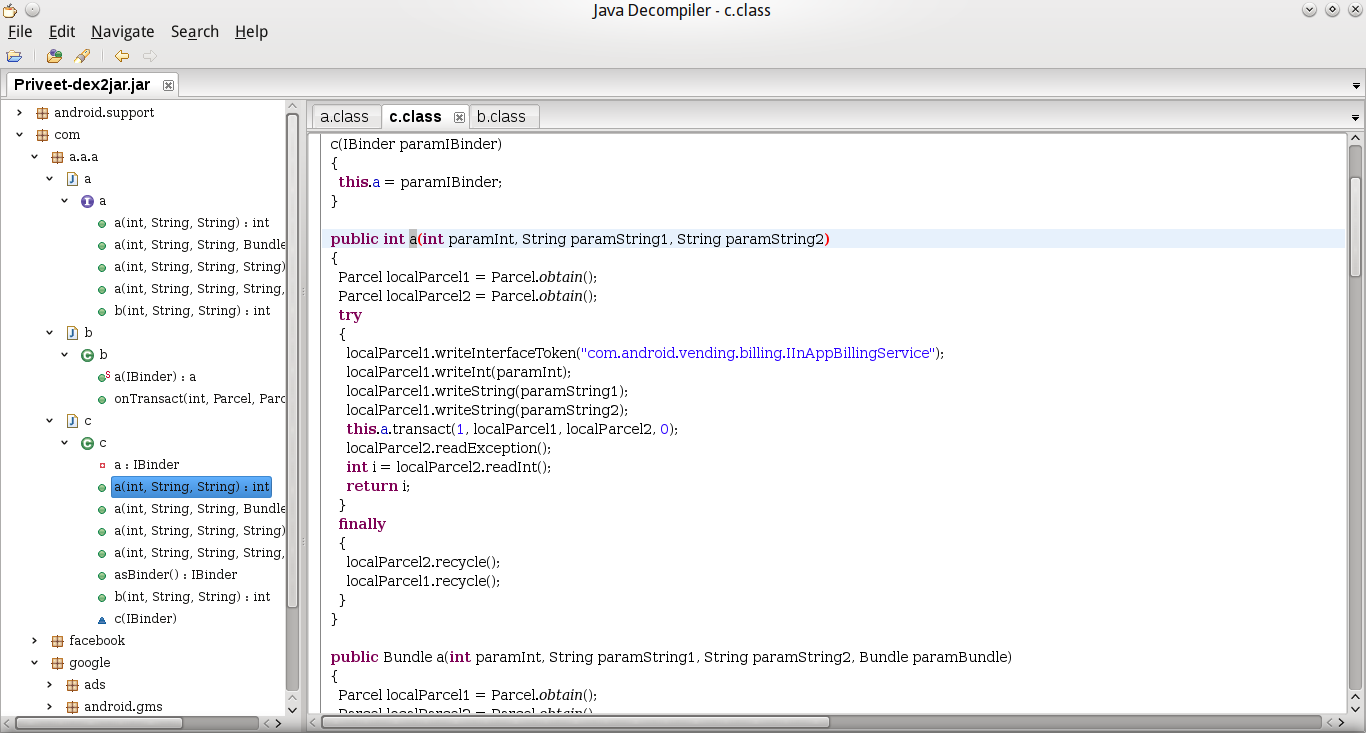
Android App使用Java語言進行開發,因此十分容易就可以被反編譯出近乎原始的程式碼。也因為這個特性,許多人在寫Android App的時候會喜歡去反編譯別人寫好的程式,再挪為己用,雖然很不道德,但這也是一種有效提升軟體開發速度的方法。但換個角度想,如果是自己寫的程式碼被盜走的話,這就對自己不太有利了,所以學習如何防止自己程式碼被偷也是一個很重要的課題。
Android App的安裝檔案是副檔名為.apk的檔案,可以直接在Android環境下執行,將App安裝好。若要將App上架到Google Play上,必須要先將Android專案輸出成簽署(Signed)過的apk檔。再將這個apk檔案上傳到Google Play上發佈出去。將App上架後,其他使用者就可以透過Google Play直接安裝該App。
很明顯地,提供apk檔案給別人安裝App,是十分危險的事情,因為apk檔案只要經過簡單的步驟(之後會提到)就可以反編譯出原始的程式碼。但如果覺得將App上架到Google Play上就一定安全的話,那就大錯特錯了,因為從Google Play上安裝的App,也是有辦法拿到它的apk檔。
反編譯Android程式
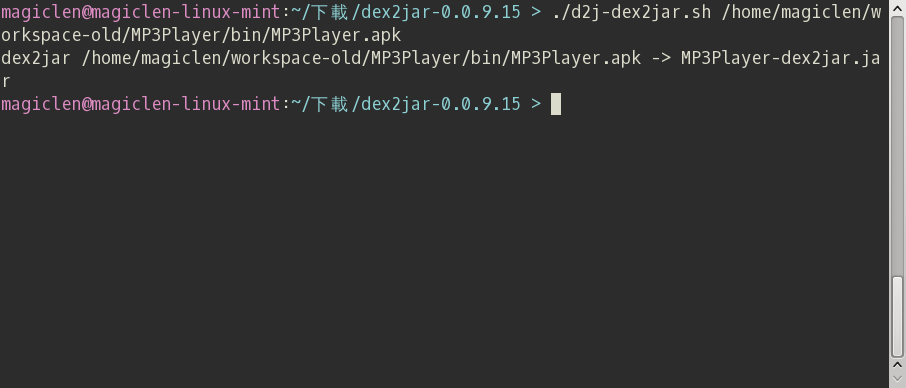
dex2jar在命令列下使用,命令格式如下:
d2j-dex2jar.sh apk路徑
執行命令後,稍等一下子,jar檔案就產生出來了。
防止Android程式被反編譯
Android ProGuard
Android SDK中提供了ProGuard來保護與最佳化Android App的安裝檔。身為一位稱職的Android程式設計師,在Android App發佈或是上架之前一定要使用ProGuard來保護程式碼,避免程式遭有心人士偷走。
啟用ProGuard
在Android專案根目錄下,有個「project.properties」檔案,找到以下字串,並移除掉前面的「#」,即可啟用ProGuard。
#proguard.config=${sdk.dir}/tools/proguard/proguard-android.txt:proguard-project.txt
這行文字的意思是告訴Eclipse在編譯Android的時候使用proguard對程式碼進行混淆,並指定混淆的參數設定檔。預設的Android專案會在開頭加上「#」,表示此行文字為註解,也就是沒有開啟ProGuard。
使用ProGuard
啟用ProGuard可能會遭遇的問題
由於有些程式是不可以被混淆的,例如有使用到「Class.forName」這類方法來呼叫的套件。可以藉由修改Android專案目錄下的ProGuard設定檔「proguard-project.txt」,加入-keep參數來保留指定的程式碼不被混淆。通常-dontwarn參數也會跟-keep合用,目的是要讓ProGuard不要去檢查指定Class下程式碼的錯誤(當然若有出現錯誤再加也不遲)。
有許多程式用了ProGuard之後會出現型別轉換錯誤,可以加上「-keepattributes Signature」參數,保留程式的簽名。
以下是proguard-project.txt的設定參考:
1 2 3 4 5 6 7 8 9 | -keep class com.google.** { *; } -dontwarn com.google.** -keep class com.facebook.** { *; } -dontwarn com.facebook.** -keep class org.apache.** { *; } -dontwarn org.apache.** -keepattributes Signature |
關於作者
7.31.2014
How can I get the Google cache age of any URL or web page?
http://stackoverflow.com/questions/4560400/how-can-i-get-the-google-cache-age-of-any-url-or-web-page
How can I get the Google cache age of any URL or web page?
Use the URL
http://webcache.googleusercontent.com/search?q=cache:
Example:http://webcache.googleusercontent.com/search?q=cache:stackoverflow.com
It contains a header like this:This is Google's cache of http://stackoverflow.com/. It is a snapshot of the page as it appeared on 21 Aug 2012 11:33:38 GMT. The current page could have changed in the meantime. Learn more
Tip: To quickly find your search term on this page, press Ctrl+F or ⌘+F (Mac) and use the find bar.
標籤:
Online Tools,
web
6.01.2014
How to Add "Open with Notepad" to Right-Click (轉貼)
同理可應用到Notepad++,
參:http://www.instructables.com/id/How-to-Add-Open-with-Notepad-to-Right-Click/
Remove these ads by
Signing Up
Effects should occur immediately.
Remember:
This can be used for any and all programs.
In case you are just completely confused, use the following zip file (which also comes with a handy uninstall) that will change your regedit key accordingly)
Download OpenWithNotepad registry hack
參:http://www.instructables.com/id/How-to-Add-Open-with-Notepad-to-Right-Click/
How to Add "Open with Notepad" to Right-Click
by laminterious
I
personally hate to use "open with" due to the time, even if its only a
few seconds, and having to then remember where exactly a certain program
is located in my directory.
This will show you how to add ANY program to the Right-Click (Context Menu for all of your Files).
It's Easy, you cant screw it up, and it saves a bunch of time and hassle.
Since we will be dealing with regedit, and not everyone is familiar with it, i will be breaking down the steps to very simple, easy, and concise steps that anyone can follow.
This will show you how to add ANY program to the Right-Click (Context Menu for all of your Files).
It's Easy, you cant screw it up, and it saves a bunch of time and hassle.
Since we will be dealing with regedit, and not everyone is familiar with it, i will be breaking down the steps to very simple, easy, and concise steps that anyone can follow.
Step 7: Seventh
Name that Key "Open with Notepad"
Right click on the Open with Notepad key and make another Key
Step 11: Finished
Close regedit and marvel at the ease of opening text documents!Effects should occur immediately.
Remember:
This can be used for any and all programs.
In case you are just completely confused, use the following zip file (which also comes with a handy uninstall) that will change your regedit key accordingly)
Download OpenWithNotepad registry hack
標籤:
Software
12.12.2013
訂閱:
文章 (Atom)